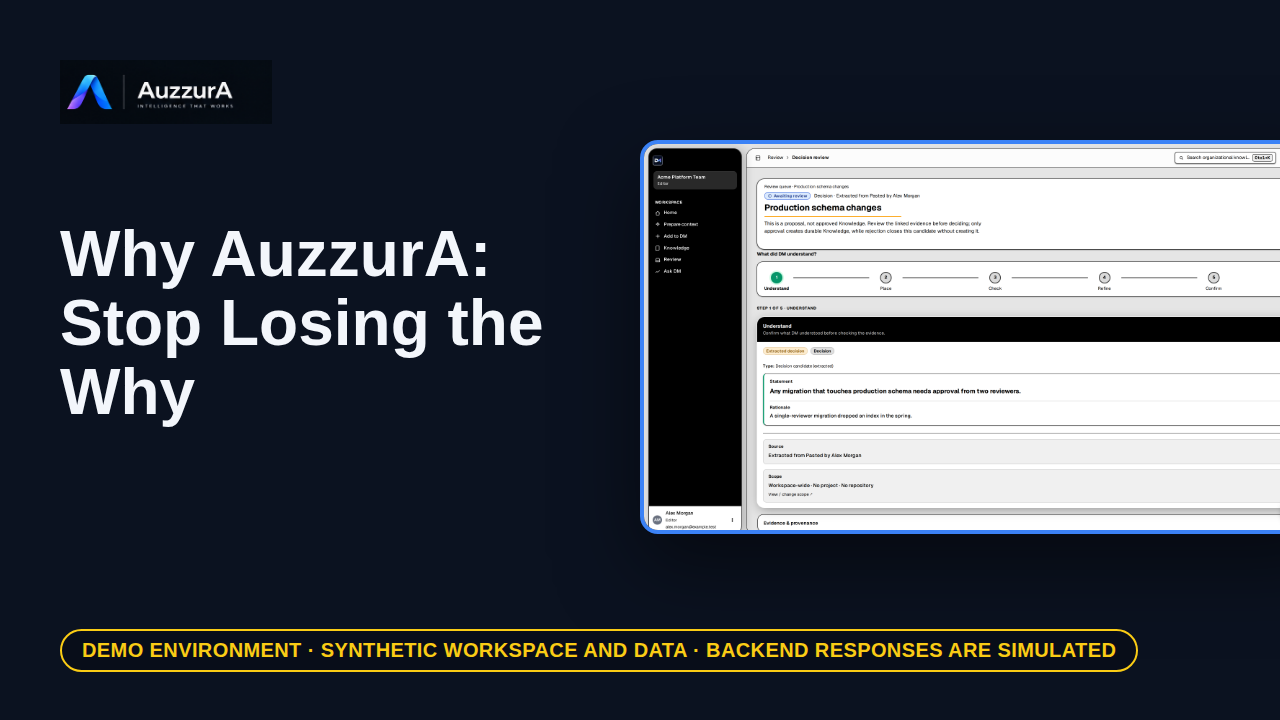
Why AuzzurA: stop losing the why
An elevator demo explaining lost decision rationale and continuity. The code tells you what changed. Who remembers why?
For: Founder, head of engineering, design partner
Demo
Show one end-to-end decision lifecycle with evidence and human approval. A meeting note is not an approved decision. Here is the difference.
Read the steps OR watch the video. Both teach the same outcome, and neither is needed for the other.Jump to the video
What it means: A meeting note is not an approved decision. Here is the difference. Start in Add to DM, with a source you already have.
What it means: Choose Add source material.
What it means: Paste the note. It holds the choice, and the reason behind it.
What it means: Select Analyze with DM.
What it means: DM proposes one decision candidate. It is a proposal, so it still needs a person. Select Review.
What it means: Check what DM understood, and where it came from. The statement and its reason match the note.
What it means: Place is optional here, so continue.
What it means: Check lists any blocking issues. DM found none here.
What it means: Refine is where you would correct the wording. It is right as written.
What it means: A person approves. Select Approve.
What it means: DM records the approval as durable knowledge. Open it.
What it means: It now sits in the approved Knowledge library. Select it.
What it means: Open the decision.
What it means: The decision has its reason and its source on record.
What it means: Later, a new teammate wonders why. They open Ask DM.
What it means: They type the question in their own words.
What it means: Select Send.
What it means: The answer comes from the approved decision, and shows the source it rests on. The team's reasoning is there when it's needed.
The extraction and the Ask DM answer are not real AI output: both are invented fixtures, so quality, coverage and accuracy of real results are not shown or verified.
Correcting the candidate, requesting evidence, conflicts with earlier decisions, follow-through and outcomes are not demonstrated.
Which roles may approve is not verified; the demo signs in as a workspace editor and the simulated backend accepts the approval.
Demo environment · synthetic workspace and data · backend responses are simulated. A meeting note is not an approved decision
The extraction result, the checks, the approval, the approved decision and the Ask DM answer are SIMULATED: this guide uses a synthetic workspace and fixture data, not a deployed backend or a real AI run. It shows the sequence DM is designed around: a source becomes a proposal, a person approves it, and only then can it be recalled as approved knowledge. It does not claim every decision in a real workspace is captured or available.
A banner reading "Demo environment · synthetic workspace and data · backend responses are simulated" stays on screen for the whole video.
On screen: Start on "Add to DM" (/add). Click "Source-based intake". The next view is "Source-based intake" (/add/source). A highlight labelled "Source-based intake" marks "Source-based intake You have source material. DM understands it and p…".
Narrator: A meeting note is not an approved decision. Here is the difference.
Narrator: Start in Add to DM, with a source you already have.
On screen: Click "Add source material". The next view is "Add source material" (/intake/bundles/new). A highlight labelled "Add source material" marks "Add source material Paste text and/or attach files together. DM analy…".
Narrator: Choose Add source material.
On screen: Type "Sync notes: we agreed that any migration touching production schema needs two reviewers. A single-reviewer migration dropped an index in the spring. Priya owns the rule." into the "Paste text" field. A highlight marks "The source note".
Narrator: Paste the note. It holds the choice, and the reason behind it.
On screen: Click "Analyze with DM". The next view is "Pasted notes" (/intake/bundles/bundle-two-reviewers). A highlight marks "Analyze with DM".
Narrator: Select Analyze with DM.
On screen: Click "Review". The next view is "Production schema changes" (/candidates/cand-two-reviewers/review). A highlight labelled "Nothing is approved yet" marks "Source material produces candidates for review. Approved candidates b…".
Narrator: DM proposes one decision candidate. It is a proposal, so it still needs a person.
Narrator: Select Review.
On screen: Click "Continue". The next view is "Production schema changes" (/candidates/cand-two-reviewers/review). A highlight labelled "Statement and reason" marks "Any migration that touches production schema needs approval from two…".
Narrator: Check what DM understood, and where it came from.
Narrator: The statement and its reason match the note.
On screen: Click "Next". The next view is "Production schema changes" (/candidates/cand-two-reviewers/review). A highlight labelled "Next" marks "Next →".
Narrator: Place is optional here, so continue.
On screen: Click "Continue to Refine". The next view is "Production schema changes" (/candidates/cand-two-reviewers/review). A highlight labelled "Blocking issues" marks "0".
Narrator: Check lists any blocking issues. DM found none here.
On screen: Click "Continue". The next view is "Production schema changes" (/candidates/cand-two-reviewers/review). A highlight marks "Edit if needed".
Narrator: Refine is where you would correct the wording. It is right as written.
On screen: Click "Approve". The next view is "Pasted notes" (/intake/bundles/bundle-two-reviewers). A highlight marks "Approve".
Narrator: A person approves. Select Approve.
On screen: Click "View approved knowledge". The next view is "Knowledge" (/knowledge). A highlight labelled "Approved knowledge" marks "View approved knowledge".
Narrator: DM records the approval as durable knowledge. Open it.
On screen: Click "Select the decision". The next view is "Knowledge" (/knowledge). A highlight labelled "The new decision" marks "Any migration that touches production schema needs approval from two…".
Narrator: It now sits in the approved Knowledge library. Select it.
On screen: Click "Open decision". The next view is "Two reviewers for production schema changes" (/decisions/dec-review). A highlight labelled "Open the decision" marks "Open decision".
Narrator: Open the decision.
On screen: A highlight labelled "Approved decision" marks "What was decided".
Narrator: The decision has its reason and its source on record.
On screen: Click "Ask DM". The next view is "Ask DM" (/ask-dm). A highlight marks "Ask DM".
Narrator: Later, a new teammate wonders why. They open Ask DM.
On screen: Type "Why do production migrations need two reviewers?" into the "Ask a question about decision memory" field. A highlight marks "Your question".
Narrator: They type the question in their own words.
On screen: Click "Send". The next view is "Ask DM" (/ask-dm). A highlight marks "Send".
Narrator: Select Send.
On screen: A highlight labelled "Answer from the approved decision" marks "Any migration that touches production schema needs approval from two…".
Narrator: The answer comes from the approved decision, and shows the source it rests on.
Narrator: The team's reasoning is there when it's needed.
Last verified against the product on .
An elevator demo explaining lost decision rationale and continuity. The code tells you what changed. Who remembers why?
For: Founder, head of engineering, design partner